Magic Wheel - Spin Art Drawing
- 4.0
- Rating
- 500.00K
- Installs
- Free
- Price
 Analysis by App-foxy
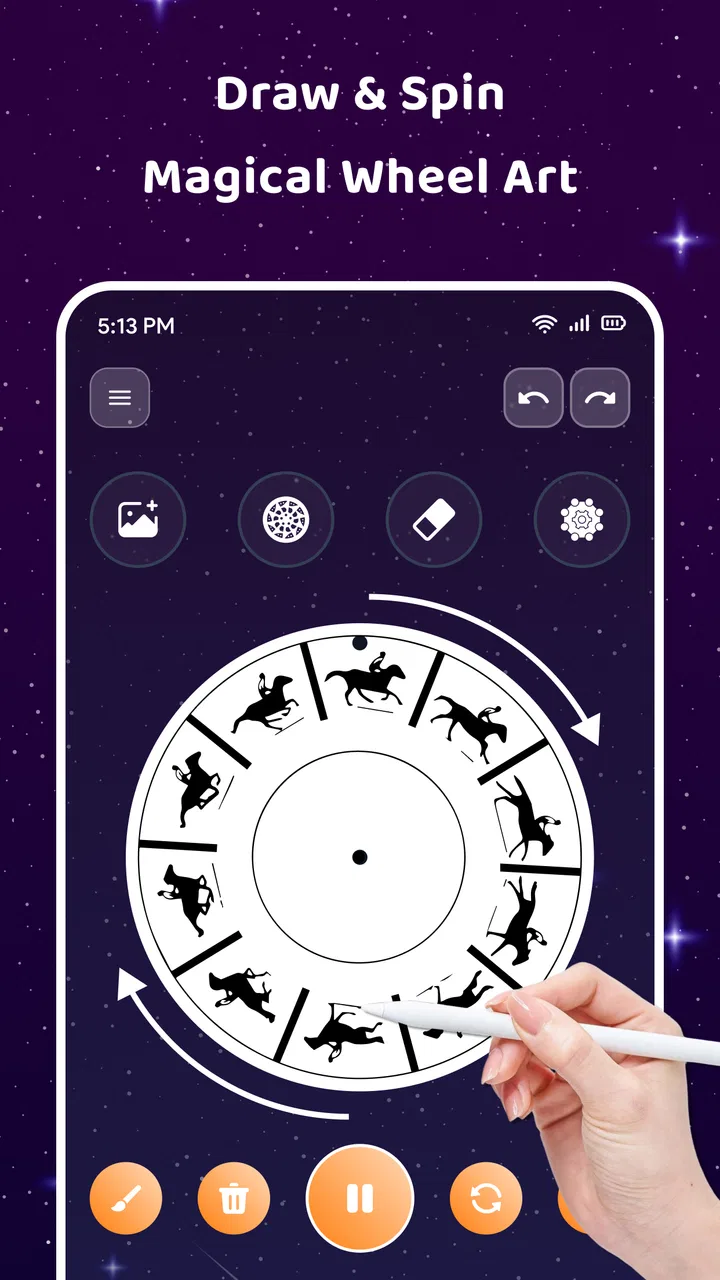
I downloaded Magic Wheel - Spin Art Drawing expecting a simple way to make colorful patterns, and that is exactly where its appeal begins. It is an art and design app from Themes Design Apps built around spinning, drawing, symmetry, and glowing brush effects. Rather than asking me to learn a complicated illustration workflow, it gives me a visual playground where a few gestures can turn into something surprisingly attractive.
That simplicity makes a strong first impression. I could open it when I had only a few spare minutes, experiment with a shape, and stop without feeling that I had left an unfinished project behind. At the same time, the app is not really trying to replace a serious drawing studio. Its value depends on whether you enjoy making abstract images and using repetition as a relaxing activity. If you want precise character sketches, layered design work, or detailed photo editing, you will probably outgrow it quickly.
What the first week feels like
The first sessions are driven by discovery. A spinning canvas changes the way I think about a mark: instead of drawing one isolated line, I am creating a repeated movement that becomes a pattern. Symmetry adds another layer of surprise, because a small gesture can spread across the composition and produce a result that looks much more deliberate than the effort involved.
You May Also Like

 Blood Strike: 2.5 Anniversary
Blood Strike’s Loadouts Turn Every Drop Into a Tactical Gamble
A close look at Blood Strike’s custom loadouts: how fast access to signature weapons reshapes its battle royale rhythm, rewards preparation, and narrows the gap between fights.

 Pandora - Music & Podcasts
Pandora’s Music Is Easy to Start, but Harder to Recover
Pandora’s strength is its low-effort path from a seed to a station. Its weak spot is how much confidence it asks you to place in connection, setup, and quiet recovery.

 8 Ball Pool
 Is Built on Rivalries, Rematches, and Routine
A close look at the rivalries, rematches, shared routines, and unanswered safety questions that turn a quick pool match into a persistent mobile community.

 Samsung Music
’s Quiet Strength Is Playing What You Already Own
Its reach comes less from spectacle than from dependable access to a personal library. That simplicity is both the app’s strongest retention engine and its ceiling.

 AccuWeather: Weather Radar
AccuWeather Review: A Quick, Clear Forecast for Everyday Decisions
For everyday plans, the best forecast is the one you can understand quickly. AccuWeather makes rain timing, radar, and local conditions easy to act on, with a few trade-offs.

 Hill Climb Racing
Why Hill Climb Racing Still Turns Crashes Into One More Run
A tiny car, a bumpy hill and one more upgrade: Hill Climb Racing keeps resurfacing because its simple chaos makes every near-miss feel personal.
More From Our News Desk



The glowing brushes are especially effective during this early period. They give even basic strokes a decorative quality, so the app can feel rewarding before I have developed any technique. I found myself trying different combinations just to see how the wheel transformed them. This is a useful distinction from a conventional sketching app: the fun is less about controlling every pixel and more about watching a visual rule turn a simple action into an image.
For a realistic everyday use, imagine waiting for an appointment or winding down after work. I can open the app, choose a brush, make a few circular movements, and let the pattern develop without planning a subject. That low-pressure routine is where the app makes the most sense. It gives my hands something to do while keeping the result visual and immediate, rather than demanding the concentration of a full drawing lesson.
The app is free to start, which makes that experimentation easy. Optional in-app purchases range from $4.99 to $29.99 per item, so I would spend time with the basic experience before paying for anything. The free entry point is enough to decide whether the central spin-art idea matches your taste. If the first few sessions feel repetitive rather than calming, additional purchases are unlikely to change that fundamental reaction.
Why the novelty works
The strongest early feature is the relationship between cause and effect. I make a small movement and immediately see a larger, mirrored or rotating design. That feedback encourages playful testing, and it removes the fear of ruining a carefully prepared canvas. In an ordinary drawing app, an accidental line can spoil a composition; here, accidents often become part of the pattern.
I also like that the app sits between drawing and visual meditation. It is not just a button that generates random art, because my gestures still influence the result. Yet it is not demanding enough to feel like work. The best first-week experience comes from treating each image as a short experiment, not as a finished masterpiece.
There is a practical tip that makes the early sessions more satisfying: begin with broad, simple movements instead of trying to create tiny details immediately. The wheel and symmetry effects need room to show their character. Once a pattern has a clear rhythm, smaller marks can add texture. Starting with detail can make the result visually busy before I understand how the repetition is shaping the canvas.
Who will enjoy it quickly
This is a good match for people who like abstract art, colorful screens, mandala-style repetition, and relaxing creative tools. It can also work for someone who feels intimidated by traditional drawing because the app gives structure without requiring formal skills. Younger users can explore it as an accessible art activity, while adults may appreciate the quiet, tactile quality after a long day. Its Everyone content rating reflects that broad accessibility.
The audience is narrower than the bright presentation might suggest. A person looking for a professional illustration app will miss the control offered by specialized alternatives. Someone who prefers puzzles, guided lessons, or a clear progression system may also find the open-ended format too loose. There is no reason to force yourself to enjoy abstract experimentation simply because the results look attractive in screenshots.
Does it keep earning attention after the first month?
The month-to-month question is more difficult. During the first week, the surprise of the wheel carries much of the experience. Later, the app has to rely on personal routines and the pleasure of refining a visual style. I found that recurring value comes from setting small creative goals: using one brush family for a series, exploring how symmetry changes a repeated motif, or making a quick image that matches a particular mood.
That approach turns random play into a lightweight practice. I am not opening it because I need another generic feed of content; I am opening it because I want to make something. The distinction matters. If I use the app only to see what happens when I spin the canvas, the novelty fades. If I use it as a short daily sketchbook for abstract patterns, it has a better chance of remaining useful.
One non-obvious strength is that the app can serve as a warm-up tool. Before working in a more demanding art program, I can spend a few minutes making symmetrical marks to loosen up my sense of color and rhythm. The resulting image does not need to be the final product. The value is in moving from passive scrolling to active visual decisions without the pressure of producing a technically impressive drawing.
It can also help when I want a decorative idea but do not know where to begin. A repeated shape made in the wheel can suggest a background, a color relationship, or a central motif that I later recreate elsewhere. I would not treat the app as a complete design pipeline, but it can be a useful source of starting points for cards, wallpapers, mood boards, or personal art exercises.
How it compares with ordinary drawing apps
Compared with a standard sketching app, Magic Wheel gives me more immediate visual drama and less precision. A normal canvas is better when I need controlled lines, detailed shading, handwriting, or a composition built from individual objects. This app is better when repetition itself is the subject. The trade-off is clear: I gain speed and surprise, but I give up the fine control that makes traditional digital drawing suitable for finished commissioned work.
Compared with coloring apps, it feels more active. Coloring usually asks me to fill an existing design, while this experience lets me create the underlying pattern through movement. That makes it more personal, although it also means the result can be less predictable. If I want a calm activity with guaranteed neat outcomes, coloring may be more comfortable. If I want to see my gestures transformed, the wheel is the more interesting choice.
It also differs from automated art generators. The app does not replace my involvement with a finished image created from a prompt. My input remains part of the process, and the visual rules amplify it. That gives the results a small sense of authorship. The limitation is that the app cannot compensate for a lack of interest in making marks; it still depends on me wanting to experiment.
Building a repeatable creative habit
For lasting use, I would keep the sessions short and give each one a narrow purpose. One day might focus on symmetry, another on the glow effect, and another on creating a calm pattern with restrained movements. This prevents every session from becoming the same sequence of random spins. It also makes progress easier to notice, because I can compare how my choices affect the overall rhythm.
A useful workflow is to pause before changing everything at once. I can keep the same brush and alter only the movement, then keep the movement and try a different visual treatment. This kind of one-variable experiment reveals what is actually changing the image. Without that discipline, the app can become a blur of taps where the final result is pretty but not especially informative.
I would also avoid judging every image immediately. The app is strongest when I allow a pattern to develop beyond the first attractive moment. Sometimes the most interesting result comes from a composition that initially looks too plain. Other times, a glowing effect can make a design feel finished before the structure is strong. Stepping back for a moment helps me distinguish genuine balance from a quick visual trick.
Maintenance, friction, and reasons the habit can fade
The maintenance burden is low in the practical sense. This is not an app that asks me to organize a large project, learn a complex interface, or maintain a detailed library just to enjoy a short session. Its lightweight format is one of its advantages. I can return after a break without needing to remember a complicated workflow.
The more important maintenance is personal. I need to bring a reason for opening it, even if that reason is simply relaxation. Without a small goal, the same spin-and-brush routine can become predictable. The app does not automatically create long-term motivation for me; I have to supply variety through the way I use its visual tools.
There is also a financial maintenance question. Because the app is free but offers individual purchases, I would be careful not to buy extras just to solve boredom. A purchase may add variety, but it cannot change whether I enjoy the central interaction. My recommendation is to use the free experience across several different days, not just one enthusiastic evening, before deciding whether paid content has a place in your routine.
The current version is 1.0.16, and the app runs on Android devices using version 7.0 or later. That broad compatibility makes it approachable for people who are not using a recent phone or tablet. Still, the visual experience will naturally depend on the screen and hardware in use; glowing patterns are more enjoyable when the display shows color clearly and touch input feels responsive.
Where fatigue appears
The main source of fatigue is repetition in the interaction itself. Spinning, drawing, and watching symmetry multiply the result is satisfying, but it is also a tightly focused concept. Once I have seen the basic visual behavior, I know what kind of surprise to expect. The app needs my curiosity to keep supplying new combinations.
Another limitation is the tension between control and randomness. The effects can make a simple gesture look impressive, but they can also make it harder to produce a specific image. If I have a precise idea in mind, the wheel may feel like an obstacle rather than a helpful tool. I would choose a conventional drawing app whenever accuracy matters more than playful transformation.
The bright presentation may not suit every mood either. Glowing brushes are a central part of the identity, but users who prefer muted, naturalistic, or highly technical artwork may find the style too decorative. This is not a flaw in execution so much as a matter of fit. The app knows what kind of visual pleasure it wants to provide, and that focus makes it less flexible for other artistic preferences.
I also would not rely on it as my only creative outlet. Its strongest exercises are abstract and pattern-based, so it leaves gaps if I want to practice anatomy, perspective, lettering, painting, or photo composition. Keeping a separate general-purpose art tool would make sense for anyone who wants broader skill development. Magic Wheel works better as a focused instrument than as an all-purpose studio.
Who should install it, and who should skip it
I would recommend it to a friend who wants a low-pressure creative break, enjoys visual repetition, or likes seeing small gestures become decorative designs. It is especially suitable for short sessions, casual experimentation, and people who want to make something without starting with a blank page in the traditional sense. The free price makes trying it straightforward, while the Everyone rating keeps it suitable for a wide audience.
I would suggest skipping it if your priority is professional control, export-oriented design work, structured education, or a deep progression system. It is also not the best choice for someone who quickly loses interest in open-ended tools. The app can be calming, but calm is not the same as endless variety. If the core wheel interaction does not hold your attention, no amount of repeated experimentation will turn it into the right art app.
My long-term verdict
Magic Wheel - Spin Art Drawing earns a place on my device when I treat it as a compact creative ritual rather than a full drawing replacement. Its first-week appeal is genuine: the wheel, symmetry, and luminous brush treatment make basic gestures feel rewarding almost immediately. The app is easy to approach, friendly to beginners, and useful for short moments when I want to make something without committing to a large project.
Its lasting value is more conditional. After the initial surprise fades, I need to create my own structure through themed experiments, warm-ups, or small daily sessions. That is not a serious burden, but it does mean the app is not endlessly self-renewing. The same visual loop can become tiring when I use it without a purpose, and users seeking precision will find its central design limiting rather than liberating.
The rating of 4.6 from over 700 ratings and more than 100K installs suggests that the accessible concept has found an audience, but those figures do not replace personal fit. I would judge it by the kind of art I want to make and the kind of break I want to take. For me, its recurring value comes from turning a few quiet minutes into an intentional visual exercise, not from promising a complete creative career in one app.
The developer, Themes Design Apps, has positioned this as a focused art experience, and that focus is both its strength and its boundary. I recommend trying the free version, using it on several separate days, and paying attention to whether you begin forming your own patterns and routines. If you do, it can remain a pleasant, low-pressure companion. If you only enjoy the first burst of glowing novelty, it is better understood as a fun occasional tool than a permanent part of your creative setup.
FAQs for Magic Wheel - Spin Art Drawing
01What is Magic Wheel - Spin Art Drawing and how does it work?
Magic Wheel - Spin Art Drawing is an app that allows users to create mesmerizing spin art designs using a virtual spinning wheel. By selecting colors and brushes, users can paint on the spinning canvas, resulting in unique and vibrant artworks. The app is user-friendly and offers a variety of customization options to enhance creativity.
02Is Magic Wheel - Spin Art Drawing free to download and use?
Magic Wheel - Spin Art Drawing is free to download, with basic features available at no cost. However, the app offers in-app purchases for additional brushes, colors, and advanced features. These purchases are optional, so users can still enjoy creating art without spending money, although some premium features may enhance the experience.
03Can I save and share my creations from Magic Wheel - Spin Art Drawing?
Yes, the app allows users to save their spin art creations directly to their device’s gallery. Additionally, it offers easy sharing options through social media and messaging apps, making it simple to showcase your artwork to friends and family. The high-resolution saves ensure your art looks great wherever it’s shared.
04What are the system requirements for Magic Wheel - Spin Art Drawing?
Magic Wheel - Spin Art Drawing requires iOS 11.0 or later for Apple devices and Android 5.0 or higher for Android devices. The app is optimized for both smartphones and tablets, providing a smooth and responsive experience. Ensure your device meets these requirements for optimal performance and functionality.
05Does Magic Wheel - Spin Art Drawing offer tutorials or user guides?
Yes, Magic Wheel - Spin Art Drawing includes a comprehensive tutorial to help new users get started. The app provides step-by-step guidance on using its features, making it accessible for beginners. In-app tips and a help section are also available, ensuring users can easily learn and explore all the creative possibilities.
Pros
- Intuitive and easy-to-use interface.
- Wide variety of colors and brushes.
- Real-time preview of spin effects.
- Supports high-resolution artwork.
- Minimal ads for a smooth experience.
Cons
- Limited free features without purchase.
- Occasional lag on older devices.
- No option to save artwork in layers.
- In-app purchases can be pricey.
- Requires internet for full features.

Magic Wheel - Spin Art Drawing
Gallery